
Talk with Our Production Team
Hello! We just need a few bits of information, and then a manufacturing expert will reach out to you directly to see how we can partner on a future production project.
Thank you! We've received your request and a member of our team will reach out shortly.
Production Catalogue
Streamline your transition from prototyping to full-scale production effortlessly
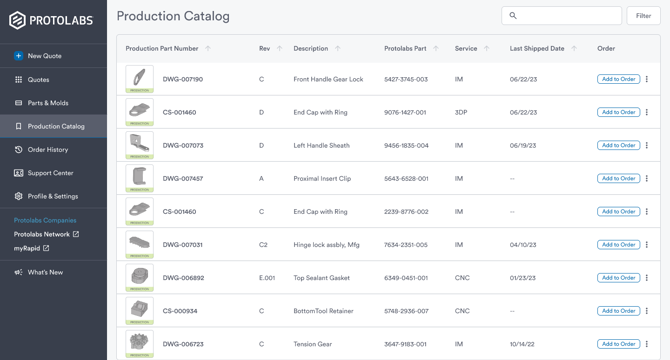
Using our award-winning quoting platform for production parts has never been easier. Our Production Catalogue allows you to manage, organise, and reorder your production-ready parts efficiently, eliminating complications.
Customers can now identify specific parts to be added to the Production Catalogue, which team members can then access for easy reordering. Elevate your production workflow today.
Frequently Asked Questions
What is the Production Catalogue?
expand_less expand_moreThe Production Catalogue helps you and your team transition parts from prototyping to production. Many preliminary versions of your parts are created during the prototyping phase,. Once product design and specifications are finalised, the Production Catalogue helps your team identify, organise, and reorder production-ready parts.
Cataloguing a part allows you to assign production part numbers, revisions, and descriptions, standardising naming conventions to improve order accuracy. In addition, cataloguing parts helps prevent accidental changes to specifications and designs.
What happens when I catalogue a part?
expand_less expand_moreCataloguing a part will distinguish production-ready parts from prototyping variants. When you catalogue a part, we create a 1-to-1 relationship between your part number and our Protolabs 11-digit part number. Once catalogued, the part will appear in the Production Catalogues of all team members who have access to that part. In addition, parts that are catalogued will have their configuration locked to prevent accidental changes.
Does cataloguing affect how my part is manufactured?
expand_less expand_moreNo. We manufacture all parts based on your specifications. The Production Catalogue is a tool for identifying, naming, and organising production-ready parts but does not affect our manufacturing processes.
Do I have to use the Production Catalogue to order my production parts?
expand_less expand_moreNo. The Production Catalogue is a tool to reorder your production parts in an easy and reliable way across team members. You can continue to order parts from Protolabs without using the Production Catalogue.
How do I catalogue a part?
expand_less expand_moreThere are many opportunities within the platform where you may catalogue a part. This feature is found on all part option menus and is labelled "Catalogue for Production". When cataloguing a part, you will be asked to assign your part number, revision, and description. Once catalogued, the part will be labelled as a production part to all team members who have access to the part.
Can I change the production part number and revision in the future?
expand_less expand_moreYes. If you need to update the part name, you can edit the assigned part number, revision, and description under your part options.
If the part configuration or design has changed, you will need to remove the old part from the catalogue and add the new part in its place.
What happens if I remove a part from the Production Catalogue?
expand_less expand_moreRemoving a part from your Production Catalogue also removes it from the Production Catalogue of team members who have access to the part. It also removes the "Production" label and unlocks the configuration, allowing for part changes.
The part may still be ordered and used as it had been prior to being catalogued. If the part was removed in error, it can be re-added at any time.
How do I share my Production Catalogue with others?
expand_less expand_moreCurrently, the only way to share catalogued parts with others is to add them to a quote and forward. The ability to share Production Catalogues will be coming soon in a future release.